Regression Channels
One or more channels, each with a center regression line and standard-deviation bands marking the segment's normal range. The live channel refits at each bar close; locked channels remain as history.
NinjaTrader 8 Indicator · Self-Drawing Regression Channels · Visual Context · Any Instrument
Watches price for short trend segments, fits a regression channel to each with standard-deviation envelope bands, and locks it the moment a breakout confirms — then starts building the next three bars later. A running map of how the trend has actually behaved, updated at each bar close, with no hand-drawn trendlines and nothing to redraw when the move shifts.
One-time Founders license License key and download at whop.com/steelysystems within minutes 7-day refund if not activated License terms One-page guide (PDF)
 Click to enlarge
What SteelyTrendChannel draws and reports in NinjaTrader 8.
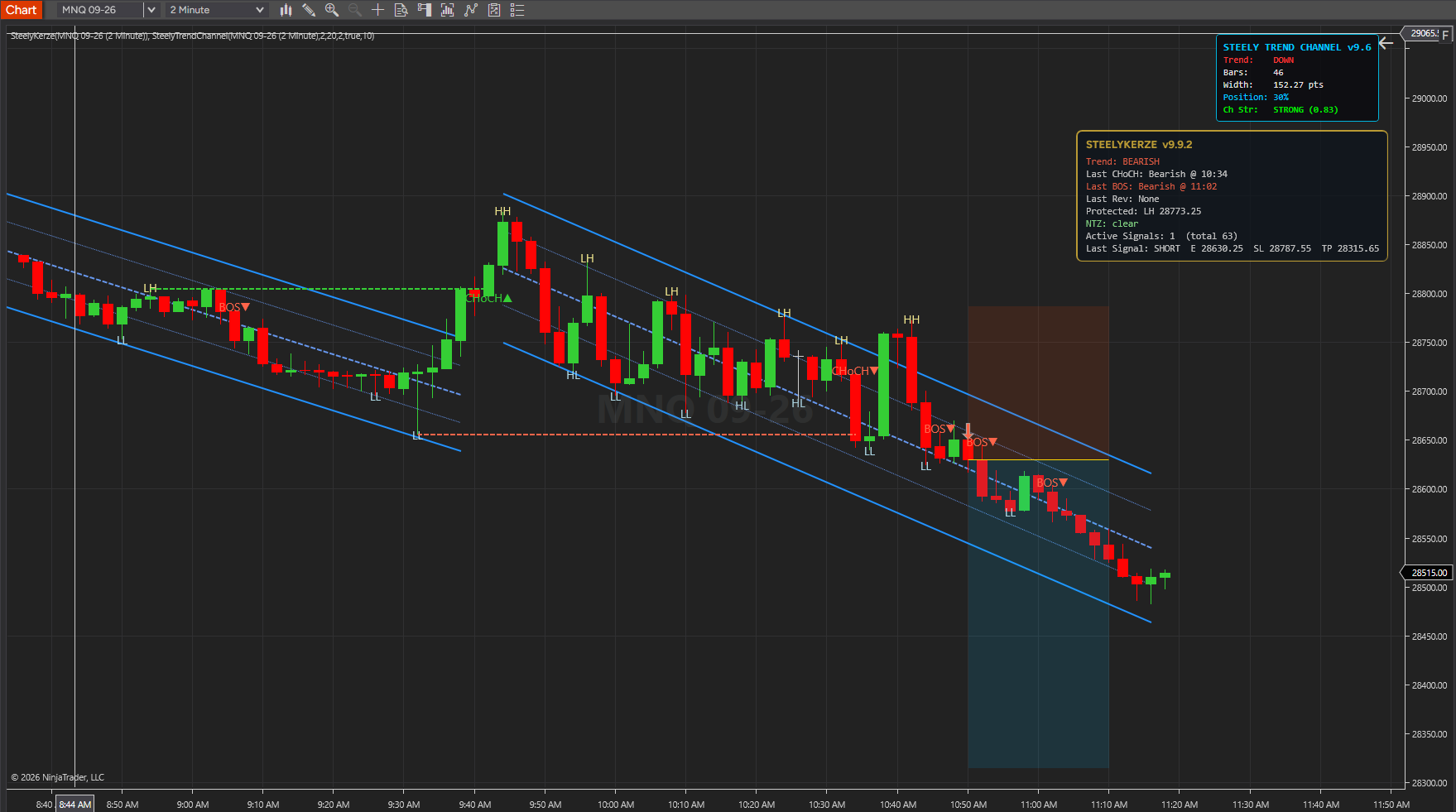
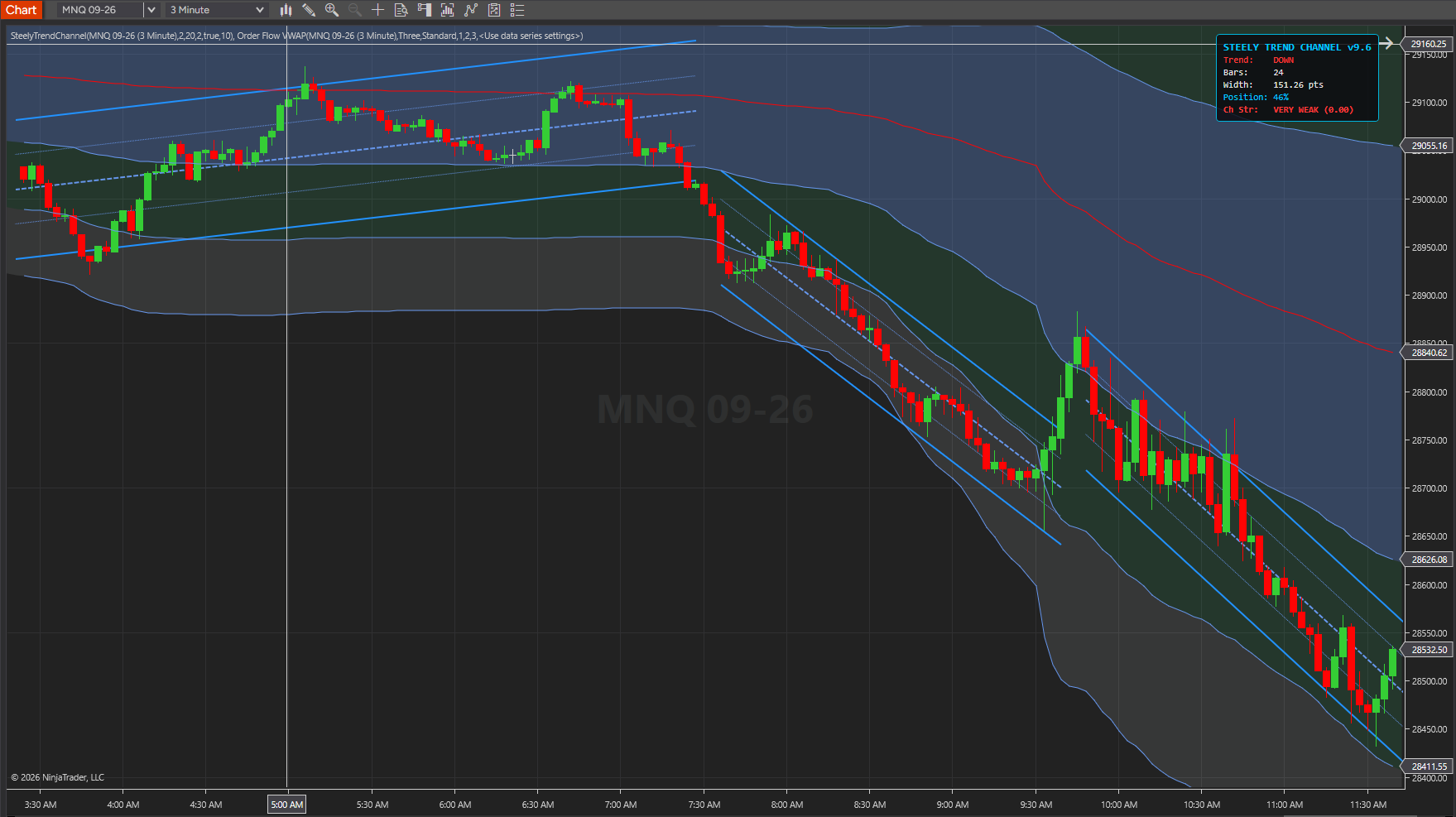
One or more channels, each with a center regression line and standard-deviation bands marking the segment's normal range. The live channel refits at each bar close; locked channels remain as history.
The moment price confirms a break, the channel freezes — a clean visual record of where each trend ended and the next began.
Because locked channels stay on the chart (the latest 10 by default), a visual history of recent trend shifts sits side by side — the structural story, not just the latest leg.
A compact dashboard summarizing the current channel state, inset clear of the price scale by default and draggable anywhere on the chart.
No signals, no flashes, no audio — by design. It answers the question your signal tools don't: what is the trend structure right now, and have we just broken it?
NinjaTrader 8 chart example. Other overlays may be visible alongside the featured indicator.
Click to enlargeRegression channels that update with the active segment and preserve locked segments for review.
Keep in mind: Channel history describes the fitted price segments. An active channel can change as new bars arrive; it is not a forecast.
A trendline is obsolete the moment price breaks it — but it's still on your chart, because redrawing by hand is slow when you're busy trading. SteelyTrendChannel automates the channel updates.
It detects each trend segment, channels it, and when price breaks out it doesn't argue with the move — it locks the old channel and builds a fresh one around the new behavior.
The chart always shows the trend as it is, not as it was twenty bars ago. It draws structure rather than firing signals — built to sit underneath whatever signal tool you already use.
Important Notice: This indicator is a non-customized charting tool provided for educational and informational market analysis only. It draws visual context and does not generate signals, constitute financial advice or trading recommendations, or solicit the purchase or sale of any instrument. Users remain solely responsible for whether, when, and how they trade. Past performance of any analytical method is not indicative of future results. Educational and informational only; not a recommendation to buy or sell.
A pure visual-context tool, built to sit underneath whatever signal indicator you use and answer the question those tools don't: what is the trend structure right now?
Layer it beneath an ORB, divergence, or break-and-retest tool to see whether a signal is firing with the channel or against a just-broken one.
Locked channels stack as a visual history, so the sequence of trend shifts across the session is readable at a glance.
The standard-deviation bands frame each segment's typical range, giving immediate context for how far price has stretched within the current channel.
NinjaTrader 8, version 8.1.x, on Windows. A live or sim market data connection in NinjaTrader 8. No other SteelySystems indicator is required — every tool runs standalone.
Yes — $159 one-time as a Standard-tier indicator. It is also part of the Foundation Pack ($199 for ORBFlow and TrendChannel — $318 bought separately) and of the Complete Suite ($1,800, all 12 paid indicators plus the free SteelyNewsPanel and SteelyStructure).
Checkout runs through Whop. Your license key and the download appear at whop.com/steelysystems (sign in with your checkout email), normally within minutes; the Install guide there walks through setup. Import the file in NinjaTrader 8 via Tools → Import NinjaScript Add-On, enter the key, and add the indicator to a chart. Email install support is included.
The license is per user. Install it on any desktop, laptop or VPS that you personally use for your own trading. Sharing the key or the files is not permitted — see the License Agreement.
A one-time Founders license with compatibility patches and install support, available through December 31, 2026. From January 1, 2027 new purchases move to a subscription model. Founders keep their one-time licenses and are not required to subscribe.
Yes, within 7 days of purchase if the license key has not been activated. Once a key is activated the sale is final — details on the Refund Policy page.
No. Every signal, level, score or panel is an analytical aid, not a trade instruction. The indicator organizes context; the decision, the risk and the outcome are yours. Read the full disclosure before use.
Yes. The Steely Custom Sounds pack is free with every indicator purchase.
Yes, heavily, and on purpose. We use leading AI models and our own custom AI tooling in modeling, analysis and development, including the research behind the DI Briefs and Steely MAGE. AI doesn't generate trade signals and doesn't place trades. The indicators run rules we designed and can show on your chart. Everything is tested in simulation and in our own trading before it ships.
Each tool runs standalone.
SteelyTrendChannel fits a regression channel to each trend segment, locks it on breakout, and rebuilds the next — a live, side-by-side map of how the trend has actually behaved. The channel you'd draw by hand, updated as new bars arrive.
One-time Founders license License key and download at whop.com/steelysystems within minutes 7-day refund if not activated License terms One-page guide (PDF)