Model-Derived Score
Displays a proprietary reading from the model’s inputs, blended with past signals of the same class once they resolve. Past signals are hypothetical; the reading is not a forecast.
NinjaTrader 8 Indicator · Elite Level Mapping & Model Scores · Fully Standalone
SteelyRangeEdge maps session levels, highlights clusters of structure, and displays a model score alongside qualifying signals. The level map and scoring inputs are analytical context—not a prediction that a level will hold or that a signal will reach its projection.
One-time Founders license License key and download at whop.com/steelysystems within minutes 7-day refund if not activated License terms One-page guide (PDF)
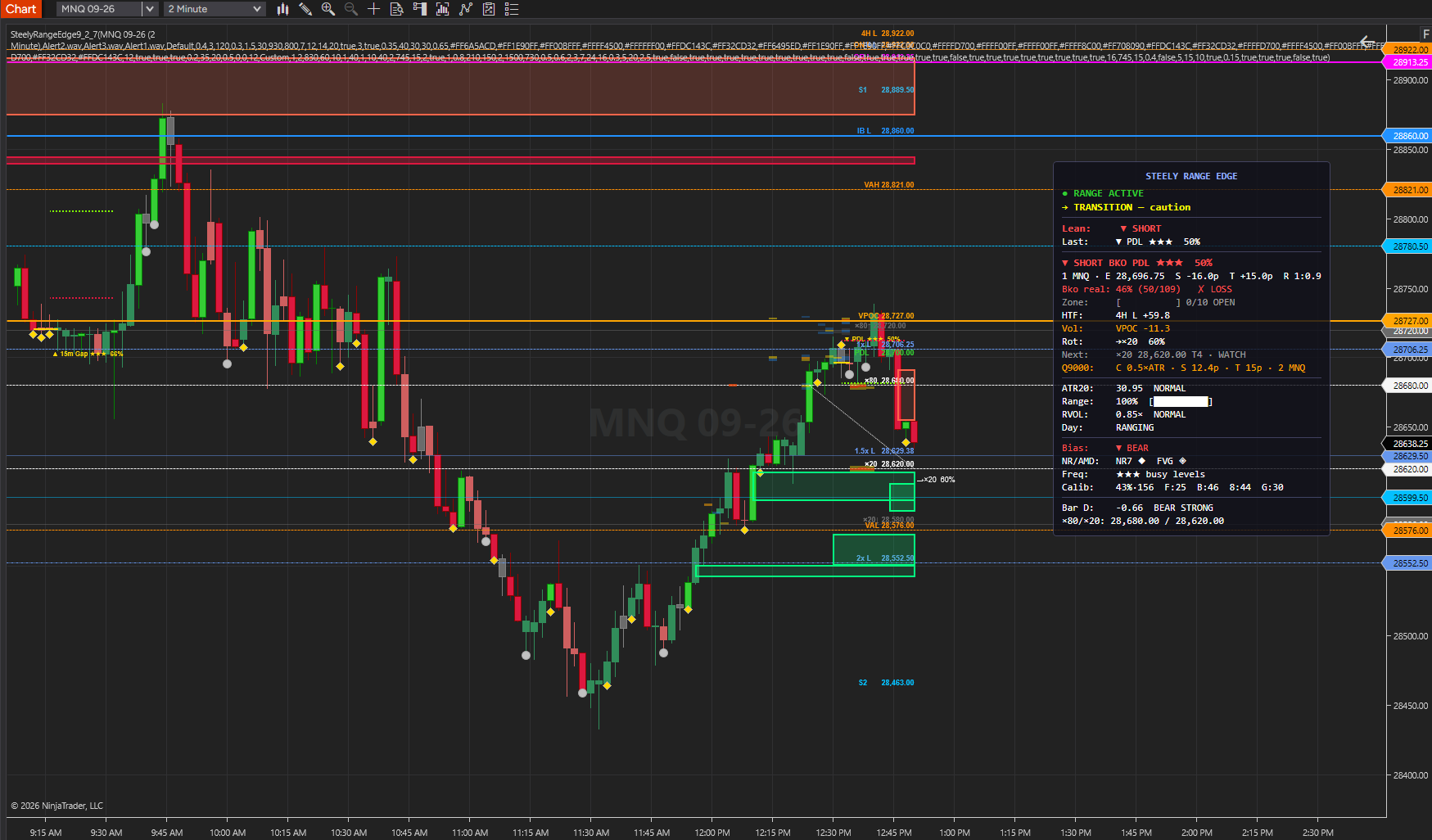 Click to enlarge
What SteelyRangeEdge draws and reports in NinjaTrader 8.
Displays a proprietary reading from the model’s inputs, blended with past signals of the same class once they resolve. Past signals are hypothetical; the reading is not a forecast.
Colors price zones by the concentration of mapped support and resistance, from lower to higher density.
Tracks prior-day H/L/C, floor-trader pivots, CPR, initial balance, opening range, overnight levels, and ×80/×20 handle references.
Includes weekly levels, 4-hour structure, and recent 1-hour swings in the model’s confluence assessment.
A fade needs a probe bar at a level, then a bar back past the probe’s open; live, it can mark before that second bar closes. Fades and breakouts show with stars, level labels, and HTF context.
A 0–10 model score summarizes the mapped levels clustered near current price. It does not identify the intentions of market participants.
Marks zones using the last opposing candle before an impulse and tracks the configured mitigation condition. These are pattern-based zones, not observed institutional orders.
Draws a projected reference toward the opposite ×80/×20 level, with a model-derived reading. Completion is not assured.
Relative volume and weighted cumulative delta contribute to the model using the chart data. No Order Flow+ license is required.
Configurable bias and score filters limit which signals appear. Filtering does not establish that the remaining signals will reach their projections.
Displays directional lean, recent signal context, zone score, nearby higher-timeframe levels, volatility, range consumption, and active filters.
NinjaTrader 8 chart example. Other overlays may be visible alongside the featured indicator.
Click to enlargeMapped levels, structural density, and model-derived readings in one workspace.
Keep in mind: Percentage-formatted outputs are model readings and past-signal counts — hypothetical, not a forecast or a verified success rate. Review the inputs and limitations before using a reading.
SteelyRangeEdge maps prior-day levels, pivots, CPR, initial balance, opening range, overnight extremes, and higher-timeframe levels. It observes how price interacts with that structure and displays qualifying fade, breakout, and reversal conditions.
The interface includes proprietary scores and percentage-formatted readings. These should not be interpreted as a verified success rate or a calibrated probability of a future outcome. Read them alongside their inputs, market conditions, and your own review.
The HUD brings level, directional, volatility, and flow context into one panel. The indicator uses the chart's market data; no companion Steely indicator is required.
Important Notice: Scores, levels, and signal markers are analytical outputs, not instructions to trade. They do not establish that a signal will reach its projection or that a level will hold. Trading decisions and risk management remain the user's responsibility. Educational and informational only; not a recommendation to buy or sell.
For index-futures day traders who work from levels — reversals, fades, breakouts, and rotations — and want every level organized by structure and model score.
Set a score threshold and bias filter to limit the displayed signals to your configured criteria. A qualifying signal is a reading, not a recommendation.
The density heatmap and 0–10 zone score show the concentration of mapped levels before a signal appears.
When price sweeps an ×80 or ×20 level, a projected ray draws to the opposite level with a model-derived reference reading, not a verified chance of completion.
NinjaTrader 8, version 8.1.x, on Windows. Chart market data only. Built-in relative volume and cumulative delta use the chart data — no OrderFlow+ license required. No other SteelySystems indicator is required — every tool runs standalone.
Yes — $159 one-time as a Standard-tier indicator. It is also included in the Complete Suite ($1,800, all 12 paid indicators plus the free SteelyNewsPanel and SteelyStructure — $2,362 bought one at a time).
Checkout runs through Whop. Your license key and the download appear at whop.com/steelysystems (sign in with your checkout email), normally within minutes; the Install guide there walks through setup. Import the file in NinjaTrader 8 via Tools → Import NinjaScript Add-On, enter the key, and add the indicator to a chart. Email install support is included.
The license is per user. Install it on any desktop, laptop or VPS that you personally use for your own trading. Sharing the key or the files is not permitted — see the License Agreement.
A one-time Founders license with compatibility patches and install support, available through December 31, 2026. From January 1, 2027 new purchases move to a subscription model. Founders keep their one-time licenses and are not required to subscribe.
Yes, within 7 days of purchase if the license key has not been activated. Once a key is activated the sale is final — details on the Refund Policy page.
No. Every signal, level, score or panel is an analytical aid, not a trade instruction. The indicator organizes context; the decision, the risk and the outcome are yours. Read the full disclosure before use.
Yes. The Steely Custom Sounds pack is free with every indicator purchase.
Yes, heavily, and on purpose. We use leading AI models and our own custom AI tooling in modeling, analysis and development, including the research behind the DI Briefs and Steely MAGE. AI doesn't generate trade signals and doesn't place trades. The indicators run rules we designed and can show on your chart. Everything is tested in simulation and in our own trading before it ships.
Each tool runs standalone.
SteelyRangeEdge brings session levels, structural density, and model-derived scores into one chart workspace. Inspect the context and make your own assessment.
One-time Founders license License key and download at whop.com/steelysystems within minutes 7-day refund if not activated License terms One-page guide (PDF)